Skip to content
fotoklarPassbild · Bewerbungsfoto

Barmer photo upload for the health insurance card

Create and upload the photo for your Barmer health insurance card: FotoKlar crops it, replaces the background and checks face, light and pose. General information is on health insurance card photo.

1What do you need?

2Document

3Your photo

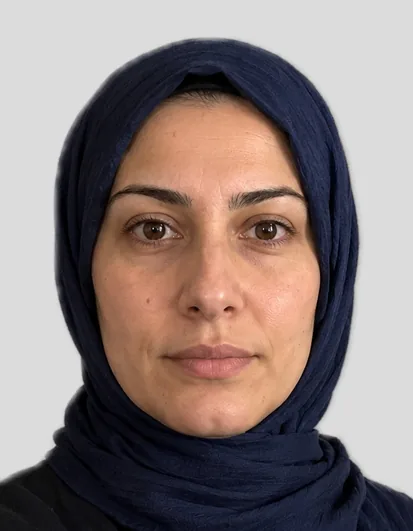
Example: biometric photo 35 × 45 mm

Example with a fictional person

Drop a photo here or – the preview is free.

Electronic health insurance card (Germany)

We check your photo and crop it to 35 × 45 mm.

  • Facing the camera, head straight, mouth closed
  • Even daylight, no shadows
  • Space above the head, shoulders in frame
  • Glasses only without glare

Health insurers do not require a biometric photo, but a frontal, well-lit picture against a neutral background in passport size 35 × 45 mm.

Size
35 × 45 mm
File
827 × 1063 px (600 dpi)
Submission
upload
Source
AOK, Foto für die elektronische Gesundheitskarte

How you get your photo

Preview

Free

Cropped, background replaced and checked – with a watermark.

Biometric photo

€7.99

  • Photo without watermark at your document’s size
  • Digital file for uploads and a 10 × 15 cm print sheet
  • Download for 24 hours, copy by email

100% money back if the office rejects the photo for not meeting the requirements. Terms

  • Payment via Dodo Payments · final price incl. VAT · no subscription
  • Files available for 24 hours, then deleted
  • Questions: support@approvavisa.com

Create the photo in 3 steps

  1. Take a photo with your phone

    Facing the camera, in daylight. We replace the background.

  2. Crop and biometric check

    Head size, eye height, light – with tips if something is off.

  3. Download

    File and 10 × 15 cm print sheet for €7.99.

In short

For the Barmer health insurance card you need a recent, frontal photo with your face clearly visible against a neutral background. A biometric passport photo is not required. Barmer asks for the photo by letter. Upload it at lichtbild.barmer.de with the order number from the letter and your date of birth – no “Meine Barmer” login needed.

Last updated: · FotoKlar editorial team

Creating the photo for the Barmer health card

  1. 1Take a photo in daylight from the front or upload one in the tool above.
  2. 2“Health insurance card” is already selected: we crop, replace the background and check the photo.
  3. 3See the free preview, buy and download the file.

Uploading the photo to Barmer online

Barmer asks for the photo by letter. Upload it at lichtbild.barmer.de with the order number from the letter and your date of birth – no “Meine Barmer” login needed.

  1. 1Create the photo at FotoKlar and download the file
  2. 2Open lichtbild.barmer.de and enter the order number and your date of birth
  3. 3Upload the photo – according to Barmer the new card arrives about two weeks after the check
Barmer also accepts the photo by post or at a branch.

Photo requirements

What Barmer itself says:

  • Photographed from the front
  • Face height 70–80% of the photo
  • Evenly and well lit
  • Eyes clearly visible – no tinted glasses, no peaked cap
  • No head covering except for religious reasons
  • Background without distracting outlines, no other people; not required to be biometric

Photo rejected – what now?

If your photo is rejected, Barmer usually tells you why. Common reasons are shadows, a busy background, a tilted head or a face that is too small.

  • Take a new photo in daylight from the front, head straight
  • Face large enough in the frame (about 70–80% of the image height)
  • Have the background replaced – FotoKlar does this automatically
  • If the insurer rejects the purchased photo for not meeting its requirements, we refund the €7.99 in full

Sources

Frequently asked questions

Anything else? Write to us at support@approvavisa.com.

How do I upload a photo to Barmer?

Barmer asks for the photo by letter. Upload it at lichtbild.barmer.de with the order number from the letter and your date of birth – no “Meine Barmer” login needed.

Does the Barmer photo have to be biometric?

No, Barmer does not require a biometric photo. The face must be frontal and clearly recognisable.

Which file format is accepted?

FotoKlar delivers a JPG – the usual format for uploads. Check your insurer’s upload page for any file size limit.

Do children need a photo?

No. Children under 15 receive a card without a photo (§ 291a para. 5 SGB V).

What does the photo cost?

The preview is free; the file costs €7.99 including VAT. Questions: support@approvavisa.com.