
In short
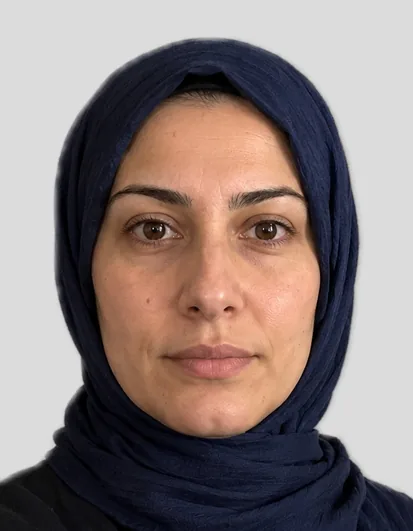
For a passport photo with your phone, have someone take it from about 1.5 metres at your eye level, using the main camera with 2× zoom, in daylight from a window in front of you, with no flash. Look straight at the camera with a neutral expression. FotoKlar then crops, replaces the background and checks the photo in the browser.
Last updated: · FotoKlar editorial team
What you need
- Your phone – the main camera, not the selfie camera
- A second person, or a stand and the self-timer at eye level
- A window with daylight in front of you
- A plain wall behind you
Instructions: taking a passport photo with your phone
- 1Stand facing a window so the light falls evenly on your face; no flash
- 2Ask someone to hold the phone at your eye level, about 1.5 metres away
- 3Use the main (rear) camera, 2× zoom if available – a selfie from arm’s length distorts the face
- 4Look straight into the lens, mouth closed, eyes open, hair away from your face
- 5Upload the photo in the tool above and check the free preview
Camera settings for iPhone and Android
- Photo mode, not portrait mode (it blurs the edges)
- No filters, no beauty mode, no HDR effects
- Highest resolution; JPG or HEIC both work
- Tap your face to set focus and exposure
Do I need a passport photo app?
No. FotoKlar works in your phone’s browser: upload or take the photo, preview it free and download it – nothing to install.
App or browser, what matters is that the result meets the biometric rules – head size, light, neutral expression. FotoKlar checks exactly that in the free preview before you buy.
Typical mistakes
- Selfie from arm’s length – the face looks distorted
- Window or lamp behind you – the face is too dark
- Shadows on the face or the wall
- Head tilted, hair over the eyes
- Portrait mode, filters or beauty mode switched on
Where can I use a phone photo?
For the health insurance card, many driving licence offices, visas and job applications – not for German ID cards and passports.
Health insurers such as DAK explicitly allow photos you take yourself. Some driving licence offices, for example Stuttgart, do not accept self-made photos. The full overview is on making your own passport photo.
Sources
- Federal Ministry of the Interior: photo sample chart – checked 21/10/2026
- DAK: what to consider for the health card photo – checked 21/10/2026
- City of Stuttgart: digital-only photos for ID documents from 1 May – checked 21/10/2026